The permissions are one of the easiest things to explain and understand when you start in the world of file systems, but it is also the cause of most problems when we share folders over the network or when we install a new application on our TrueNAS, so let’s see a brief explanation of each of them.
(If you want to skip the explanation and see directly which permissions to use in each case, go to the end of the post 😉)
UNIX permissions
These permissions are the simplest to apply and therefore, the easiest to understand. And surely, if you have ever played with Unix systems, you have come across them when listing the contents of a directory:
# Permissions   User        Group       File
-rwxrw----      peenyaa7    devteam     myfile.txt
The first column of the ls command shows the permissions of each file and are divided as follows:
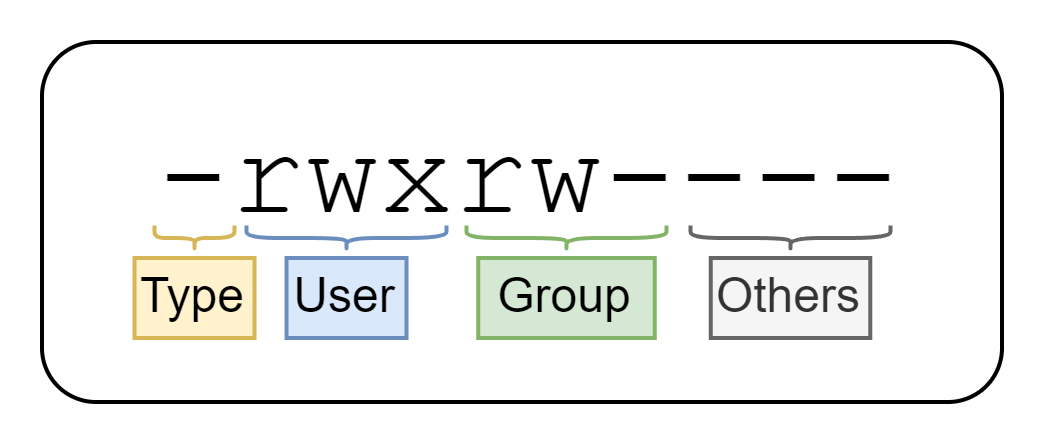
As you can see, these permissions are divided into four parts:
Type→ The type of file. The most common are-(normal file),d(directory) andl(symbolic link). You can find the full list here.User→ The permissions of the owner user (peenyaa7) inrwxformat.Group→ The permissions of the owner group (devteam) inrwxformat.Others→ The permissions of other users, also inrwxformat.
Each set of permissions (rwx) is made up of three letters that represent the following basic permissions:
| Permission | Meaning |
|---|---|
r | Read |
w | Write |
x | Execute/Access folder |
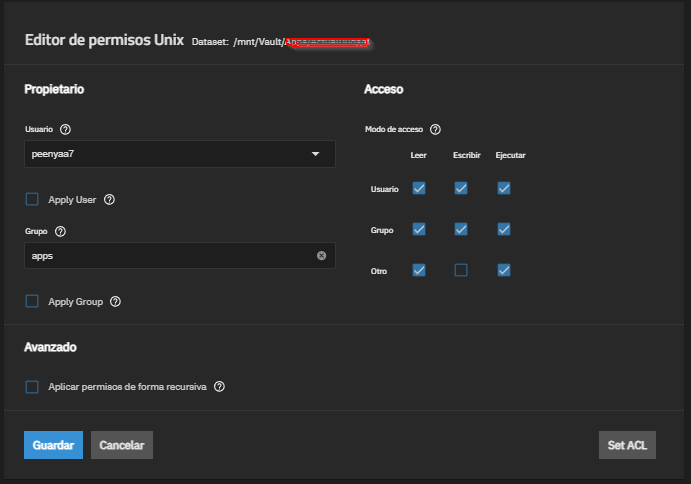
In TrueNAS we can see these types of permissions with the following interface:
Advantages and disadvantages
The advantages and disadvantages of using this type of permissions are:
| ✅ Advantages | ❌ Disadvantages |
|---|---|
| Simple and fast | You can only have one owner and one group. |
| Work on any UNIX or Linux system. | You cannot give permissions to specific additional users. |
ACL POSIX permissions
The POSIX (Portable Operating System Interface) permissions are an IEEE standard based on UNIX permissions, and as you can imagine, they extend their functionality.
What do they add? In addition to having the functionality of UNIX permissions (rwxrw----), they are capable of setting specific permissions for each user or group independently, which we know as ACL (Access Control List).
Structure of a POSIX ACL entry
Each entry of a POSIX ACL follows the following structure:
# Structure of a POSIX ACE (Access Control Entry):
type:qualifier:permissions
Where:
| Part | Meaning |
|---|---|
type | Can be user, group, other or mask. |
qualifier | Is the specific user or group name. If type is user or group, it can be omitted to refer to the owner user or group respectively. If type is other or mask, it will always be omitted. |
permissions | The permissions in rwx format. |
# Example of a POSIX ACL:
user::rwx           # Owner user with all permissions (rwx)
group::r-x          # Owner group with read and execute (r-x)
other::---          # Others have no permissions of any kind (---)
user:peenyaa7:rw-   # User 'peenyaa7' with special read and write permissions (rw-)
group:devs:r–-      # Group 'devs' with special read only permissions (r–-)
mask::rwx           # Permissions mask (rwx)
What is the mask entry?
The mask entry defines the maximum effective permissions that can be granted to users and groups other than the owner user and owner group. In other words, it acts as a filter that limits the permissions of all non-owner users and groups. If a user or group has permissions that exceed those defined in the mask, their effective permissions will be limited to those defined in the mask.
For example, in the following ACL:
user::rwx
group::r-x
other::---
user:peenyaa7:rwx
mask::r--
The effective permissions for user peenyaa7 will be r--, because the mask limits their permissions to read only, even though they were assigned rwx permissions.
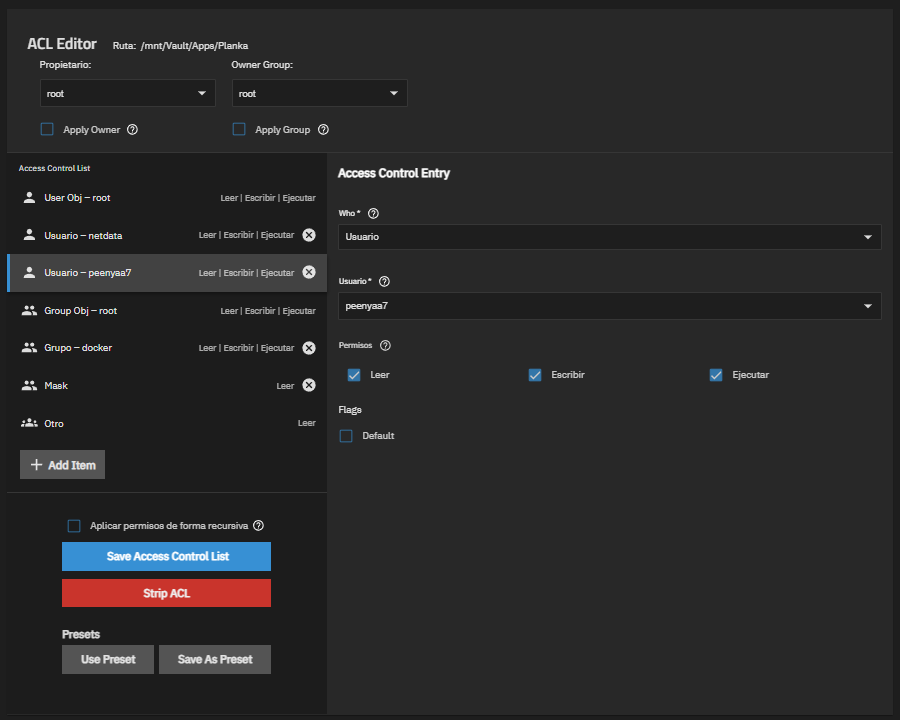
In TrueNAS, you can see and edit these permissions from the web interface:
Advantages and disadvantages
| ✅ Advantages | ❌ Disadvantages |
|---|---|
| Much more flexible. | More difficult to read and understand. |
| Allow custom permissions per user or group. | Some services only use UNIX permissions and ignore ACLs. |
| Compatible with SMB (Windows) environments. |
NFSv4 ACL permissions
The NFSv4 (Network File System v4) ACL permissions are a more modern evolution and are used in more complex environments, in fact, it is the most advanced option within the UNIX/TrueNAS world. In addition to defining what you can do, they also define when and how to inherit those permissions.
They are inspired by the Windows (NTFS) permission model, with much more specific permissions and ALLOW/DENY type entries.
Each entry or ACE (Access Control Entry) of an NFSv4 ACL follows the following structure:
# ACE Structure:
type:flags:principal:permissions
A:d:peenyaa7@example.es:rwaDxtTnNcCy
A:fd:foxy@example.es:rwaDxtTnNcCy
A:fi:zazu@example.es:rwaDxtTnNcCy
A::OWNER@:rwaDxtTnNcCy
A:g:GROUP@:rxaDxtTnNcCy
A::EVERYONE@:rxtTnNcCy
In TrueNAS, you can see and edit these permissions from the web interface, in the advanced permissions section of each dataset or shared folder:
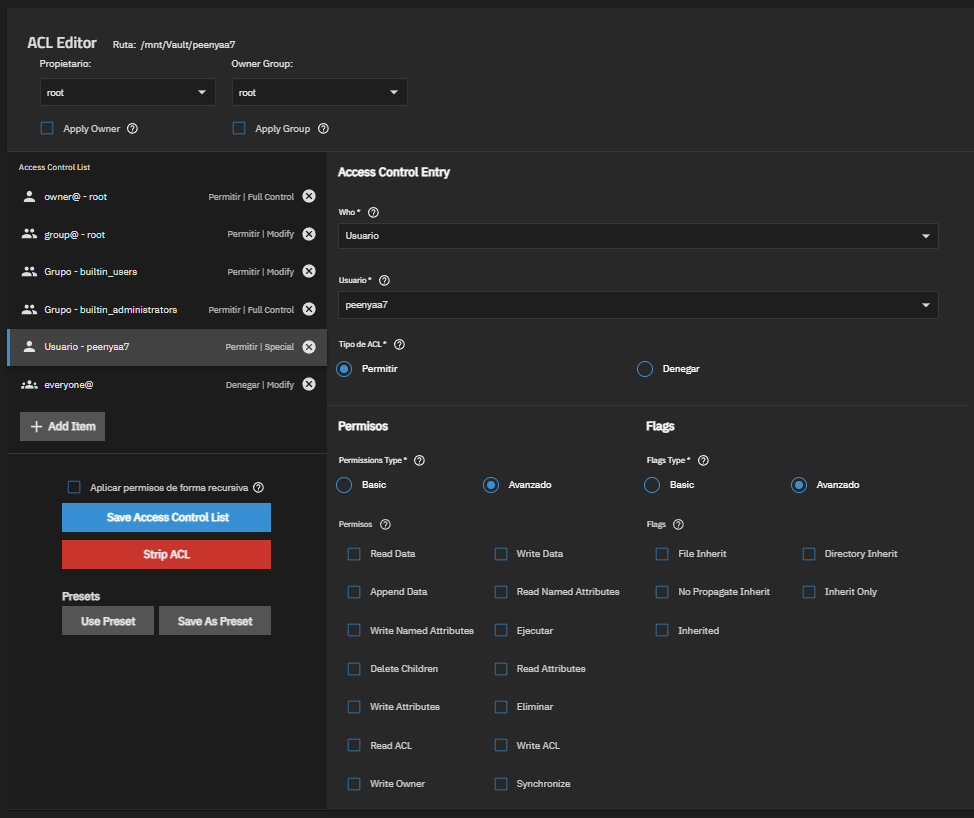
To explain each part I will divide each part into small sections to make it easier to understand 😁
ACE Type (type)
Indicates the type of ACE to be defined, it can be:
A(Access),D(Deny),U(Audit) oL(Alarm)
ACE Flags (flags)
Indicates the ACE flags that add additional context to the ACL. They define how permissions are applied and whether they are inherited or not. The ACE flags are:
| Flag | Name | Meaning |
|---|---|---|
f | file-inherit | New files will have the same ACE flags (type, principal and permissions) excluding inheritance flags (flags). |
d | directory-inherit | New subdirectories will have the same ACE flags (type, flags, principal and permissions). |
n | no-propagate-inherit | New subdirectories will have the same ACE flags (type, principal and permissions) excluding inheritance flags (flags). |
i | inherit-only | New files and subdirectories will inherit the same ACE flags (type, flags, principal and permissions) but this ACE will have the flags set to null. It is used to create “templates” of permissions that children will inherit. |
The inheritance flags (
flags) will be empty if theprincipalis a specialprincipal(OWNER@orEVERYONE@).In the case that the
principalis a group (GROUP@orgroup@example.es), theg(group) flag will be added to theflags.
ACE Principal (principal)
The principal is the user or group to which the current rule (ACE) is associated. The principal can be one of the following:
| Principal Type | Meaning |
|---|---|
Specific user (user@example.es) | Specific user to whom the permissions are assigned. |
Specific group (group@example.es) | Specific group to whom the permissions are assigned. |
Owner user (OWNER@) | Special principal. Owner user’s permissions. |
Owner group (GROUP@) | Special principal. Owner group’s permissions. |
Any user (EVERYONE@) | Special principal. Any user’s permissions. |
ACE Permissions (permissions)
By last, the permissions indicate the access of the principal. Each permission is defined with a single letter:
| Letter | Permission for files | Permission for folders |
|---|---|---|
r | Read file content | List folder contents |
w | Write content to a file | Create files in a folder |
a | Append data to the end of the file | Create subfolders within a folder |
x | Execute the file (if executable) | Access the folder and its subfolders |
d | Delete the file | Delete the folder |
D | ❌ Not applicable | Delete the contents of the folder (files and subfolders) |
t | Read file attributes such as basic permissions (not ACLs), owner, size, etc. | Read folder attributes |
T | Modify file attributes | Modify folder attributes |
n | Read “named attributes”, which are additional custom metadata (not always present) | Read folder “named attributes” |
N | Modify “named attributes” | Modify folder “named attributes” |
c | Read the file’s ACL | Read the folder’s ACL |
C | Modify the file’s ACL | Modify the folder’s ACL |
o | Modify the file’s owner | Modify the folder’s owner |
There are aliases (R, W and X) that can be used to simplify the writing of permissions, and that work similarly to POSIX ACL permissions:
| Alias | Full equivalent |
|---|---|
R | rntcy |
W | waDtTNcCy |
X | xtcy |
Advantages and disadvantages
| ✅ Advantages | ❌ Disadvantages |
|---|---|
| Real inheritance of permissions. | The most difficult to read and understand. |
| Very granular control. | They can break if permissions are changed from the CLI |
| Direct translation to the Windows (NTFS) model. |
Which permissions to choose in TrueNAS according to your case
Although the most flexible (and complex) option is the recommended one if in the future you want to extend the permissions, here are a few realistic examples of what to use in each situation if you don’t want to overthink it:
Case 1: Personal folder on the same device
In this case, the recommended are UNIX permissions, because it is a folder where only the owner user will access (and no one else should access it). In addition, these permissions are the fastest and most secure.
# Example where only the owner user has access to their personal folder:
drwx------  peenyaa7    devteam     /home/peenyaa7
Case 2: Shared folder on the same device
If on the same device you want several users from a specific group to access a folder, it is also recommended to use UNIX permissions, since they support group permissions and no specific user permissions are needed.
⚠️ However, if we want to share the folder over the network in the future, better see the next case.
# Example where several users from the 'devteam' group can access the shared folder:
drwxrwx---  root    devteam     /srv/development
Case 3: Network shared folder (SMB)
If you want to share a folder over SMB with one or more users, the most recommended is to use POSIX ACL or NFSv4 ACL because you can assign specific permissions to the desired users/groups without modifying the owner user or group permissions. In addition, NTFS (Windows) will correctly understand these permissions and display them properly in the “Security” tab.
(Take a look at the next section to decide between POSIX or NFSv4 😉)
What problems arise from mixing permissions?
In TrueNAS, one of the most recurring problems is mixing different types of permissions between parent and child datasets.
If we have a parent dataset with one type of permissions (NFSv4 ACL for example) and a child dataset with another type (POSIX ACL or UNIX), the system will not know how to interpret the inherited permissions from the parent and apply them (translate them) correctly to the child. At this point, problems arise: users with permissions that cannot access (or applications that cannot access and do not start), users who have been explicitly denied a permission and suddenly have it, etc.
To get to the point: mixing types of permissions breaks consistency, inheritance and compatibility between operating systems and security. So always choose one type of permission and keep it for the entire dataset tree.
How do I know if I have to use POSIX ACL or NFSv4?
To simplify it and not complicate things further, here is a summary:
| Use POSIX if: | Use NFSv4 if: |
|---|---|
You only need basic additional permissions (rwx) for users or groups | If you share over NFSv4 and not over SMB (in this case it is mandatory to use NFSv4) |
| You do not want to explicitly deny a permission to a user | You need granularity in your permissions (for example, that a user can create files but not delete them) |
| You do not need complex inheritance | You want NTFS-like permissions and not basic extended (rwx) ones |
If you have made it this far, thank you for reading! I hope this explanation has helped you understand a little better the permissions in TrueNAS and how to use them correctly. If you have any questions or want me to go deeper into any topic, don’t hesitate to let me know. See you in the next post! 👋